

Entering Non-Client Related Payments in CARET Legal
CARET Legal is a cloud-based comprehensive program that supports law firms’ daily operations. It includes:
-
-
- contact management

- matter management
- lead tracking / CRM functionality
- time and expense tracking
- trust accounting
- billing
- general ledger accounting
- contact management
-
In this latest article on CARET Legal’s features, we announce the addition of General Deposits – a means of accepting payments not related to clients or matters.
THE PROBLEM
Law firms occasionally receive payments that are not related to specific clients or matters. Perhaps there is someone renting space within the firm. Perhaps there is a refund from a utility company. How can the person responsible for receiving payments assign this firm-related payment to an account other than Fee Income?
THE SOLUTION
- In CARET Legal, go to Accounting > Invoices & Payments
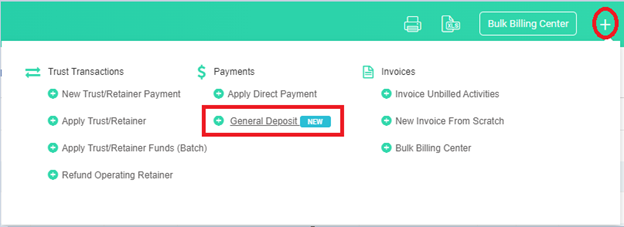
- Click on the plus (+) sign on the colored action bar and select General Deposit.
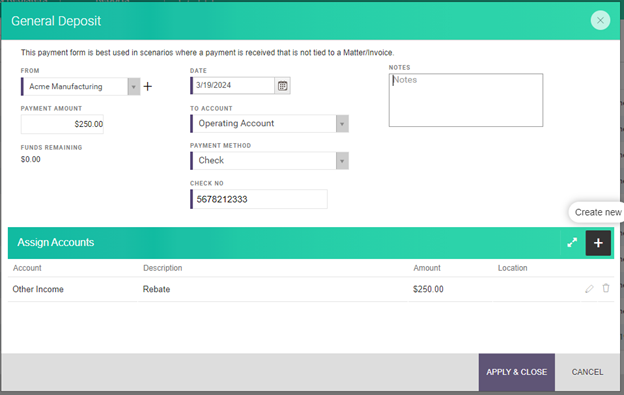
- Select the name of the person or company who sent the payment
- Enter in the Payment Amount
- Enter the Date
- Assign the payment to a bank account
- Select the Payment Method
- In the lower part of the window, click on the plus (+) sign to bring up a row that allows you to select the income account to apply the payment
- Optionally, enter a description
- Enter the amount
- Click on Apply & Close to save your entry and record the payment
CARET Legal is committed to providing an all-in-one solution for law firms and is the #1 high performer on customer satisfaction out of all legal practice management platforms according to G2. At Crosspointe, we’re proud to support this program as certified consultants, providing training and customization services for our clients. Want to know more? Call us at 877-375-2810 or write to us at info@crosspointecg.com.